

You finally share that cool cherry pie recipe–the one with the flaky crust, perfectly sweet filling, and mouth–watering photos. Within minutes, the likes start rolling in. Saves go up. Engagement spikes. And then the question hits you: can you see who shared your Instagram post?
The answer is sometimes. Instagram lets you see how many people shared your post, and in certain cases, it even shows who reshared it. But it’s not always that simple. Between private accounts, DMs, and anonymous sharing, a lot of that activity stays behind the scenes.
In this guide, you’ll learn how to see who shared your Instagram post, why some reshares don’t appear at all, how Story reshares actually work, and safe ways to monitor IG activity–including private Instagram viewer–without putting your account at risk.
View Instagram Activity Anonymously
Stop letting privacy settings keep you in the dark. I recommend Peekviewer, a superior private account viewer that stands out as the top choice—offering unmatched performance for tracking stories and activities anonymously. From viewing restricted posts to monitoring daily updates, it provides the accuracy and customer support you need to stay informed without being seen.
How to See Who Shared Your Instagram Post
Instagram does offer post–sharing insights–but they don’t always show the full picture. If you’ve ever seen shares go up without any names attached, you’re not imagining things. Here’s exactly where Instagram reveals sharing data, what you can actually see, and why the “View Story Reshares” button sometimes vanishes.
Where Resharing Data Appears
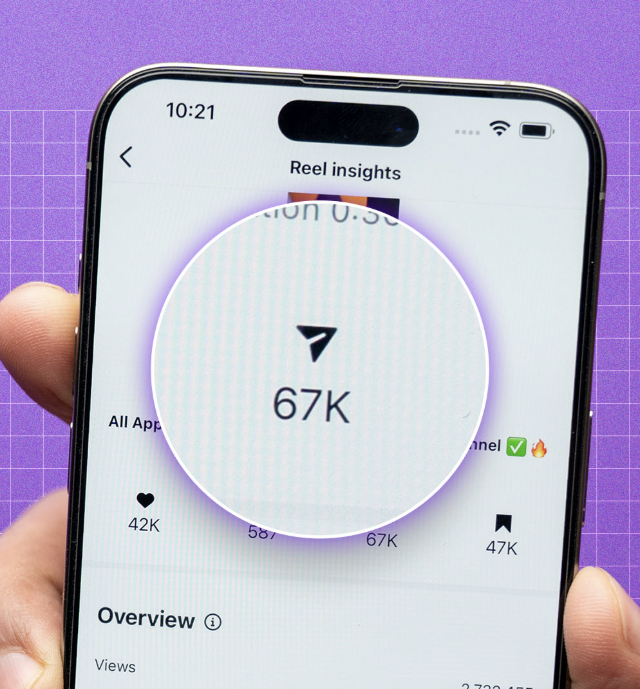
To unlock sharing insights, your account must be professional (creator or business). Once it is:
- Open the post you’re curious about
- Tap View Insights
- Look for the paper airplane icon – this shows how many times your post was shared
- If someone reshared your post to their public Story, you may also see a View Story Reshares button
This is the only place where Instagram ever shows reshare details – there’s no hidden menu or extra setting.
When the “View Story Reshares” Button Is Visible
That button doesn’t appear randomly. It shows up only if all of the following are true:
- Your post was shared publicly to someone’s Instagram Story
- The Story is still live (within 24 hours)
- The user didn’t restrict their Story visibility
- The share was made directly using Instagram’s built–in share feature
When everything lines up, tapping the button reveals the profiles that reshared your content.
What Types of Shares Are Counted
Instagram tracks every type of share, including:
- Shares to Stories
- Shares sent via DMs
- Shares using the copy link option
- Share through share to…” (WhatsApp, text messages, Messenger, etc.)
But here’s the catch: only public Story reshares show usernames. Everything else stays anonymous.
Limitations for Private Accounts
When a private account shares your post, how to see who shared your Instagram post becomes limited. Their username stays hidden, their Story never appears under View Story Reshares, and Instagram still counts the share – but treats it as anonymous activity.
So if your share count is climbing but no names appear, private accounts are usually the reason.
You Might Also Like

Can You See Who Sent Your Instagram Post?
Another question that comes up all the time is: can you see who sent your Instagram post?
It’s a fair question – especially when your post suddenly starts getting shared everywhere.
The short answer is no. When someone sends your post through Direct Messages (DMs), Instagram keeps that activity completely private. You’ll only see the total number of shares – never the sender, the recipient, or the conversation it was shared in.
This applies no matter how the post is sent:
- In a group chat
- In a private one–on–one conversation
- From a public or private account
- With or without the caption attached
So if you’re refreshing Insights and asking yourself, “Can you see who sent your Instagram post?” the answer doesn’t change. DM shares are always anonymous and private by design
Why Can’t I See Who Shared My Post on Instagram?
If your share count is climbing but the View Story Reshares button is nowhere to be found, you’re not alone. This is one of the most common frustrations for creators and businesses asking, why can’t I see who shared my post on Instagram? Below are all the real reasons this happens – and what they actually mean.
1. The Person’s Story Is Private
If someone with a private Instagram account shares your post to their Story, Instagram hides their identity completely. Even if they follow you – and even if you follow them back – can you see who shared your Instagram post? In this case, the answer is no. The share is still counted, but it’s treated as anonymous and won’t appear in your list.
2. The Story Expired
Instagram Stories only live for 24 hours. Once that window closes, the reshare disappears from your Insights. If you didn’t check in time, there’s no way to see who shared your Instagram post after the Story expires – even though the share number may still reflect that activity.
3. The Reshare Happened Through DMs
Shares sent via direct messages are always private. Instagram does not reveal:
- Who sent the post
- Who received it
- Where it was shared
This is why many users ask can I see who shared my Instagram post, only to find a number with no names attached.
4. The User Screenshotted Your Post and Uploaded It Manually
If someone screenshots your post or downloads it and then uploads it to their own Story or feed, Instagram doesn’t count it as a reshare. That means even in Insights, can you see who shared your Instagram post? Unfortunately, in this case, you can’t. Specifically:
- No username appears
- No View Story Reshares button
- No link back to your original post
From Instagram’s perspective, it’s treated as an entirely new upload.
5. You Don’t Have a Professional Account
If you’re using a personal account, Instagram won’t show you sharing Insights at all.
Only business and creator accounts can access:
- Share counts
- Story reshare data
- Engagement breakdowns
Without upgrading, there’s no way to see who shared your Instagram post.
6. The Post Didn’t Receive Public Story Reshares
Not all shares are equal. If your post was shared only:
- Via DMs
- By private accounts
- Through copied links
Then no public Story reshares exist – and nothing will show up under Insights.
7. The Share Was Made Before Insights Were Available
Older posts sometimes display incomplete or missing data, especially if they were published before Instagram expanded its Insights features. In these cases, Instagram may still show engagement numbers, but reshare details simply aren’t stored.
How to See Who Shared Your Instagram Story — Using Peekviewer
If you’re worried that your cherry pie recipe is being viewed or reshared by random accounts – maybe even by someone who didn’t leave a like or follow – you’re not overthinking it. You might be asking, can you see who shared your Instagram post. Instagram doesn’t always reveal viewers, especially with anonymous view. That’s where Peekviewer comes in.
Peekviewer lets you view public and private Instagram accounts, Stories, Highlights, and posts online, anonymously, and without an account, and it also helps you check private or close friends stories with the Instagram close friends Story viewer.
Features
- Private profile access: View photos and Stories from private Instagram accounts anonymously, without restrictions.
- Complete anonymity: Browse posts, Stories, and Reels without the account owner being notified.
- Private story viewer: Watch private Stories discreetly, without appearing in viewer lists or triggering alerts.
- Save & download content: Download high–quality posts and Stories, with saved Stories remaining available for up to three months.
- Engagement monitoring: Track likes, or use the Anonymous Instagram Comment Viewer to understand engagement activity.
How to Use Peekviewer
- Visit Peekviewer
- Enter the username of the Instagram account
- Select Stories, Highlights, or posts
- View and download content anonymously
Anonymous Story Viewer

Worried about someone who suddenly blocked you? They might still have some cool posts or Stories from your account that you haven’t seen. If you’re asking “how can I see who shared my post on Instagram,” with Anonymous Story Viewer, you can easily check blocked or restricted accounts – perfect for staying in the loop and keeping an eye on any reshared content from your account.
Features
- Invisible ghost: Browse content anonymously, keeping your views completely private
- Time guardian: Save posts or Stories for reference or offline use
- Device chameleon: Works on desktops, tablets, and smartphones
- Blocked & hidden account access: See content from blocked or restricted accounts, even if you’ve been cut off
- Deep scan: Track new followers, likes, comments, and other interactions – ideal for discreet monitoring
Accountviewer
Ever notice a private account visiting your page? Curious how to see who shared your Instagram post? Accountviewer lets you safely explore posts, Stories, and engagement online. You can view private content, track interactions, and monitor your profile without using the app. It works like an IG spy, letting you browse incognito with a full private viewer experience.
Features
- Private account access: View private posts, Stories, and Reels that are normally hidden
- Advanced analytics dashboard: Track likes, comments, mentions, engagement patterns, and posting frequency
- Premium support: 24/7 live chat to answer any questions
- Hassle–free experience: Works fully online – no app download or Instagram login required
Conclusion
If you’re asking can you see who shared your Instagram post, the truth is Instagram only gives you a partial view. Private accounts, DMs, expired Stories, and even manual reposts keep a lot of activity hidden, so it’s easy to see your share count rising without knowing exactly who reshared your content.
If you want to know how to see who shared your Instagram post, tools like Peekviewer, Anonymous Story Viewer, and Accountviewer give you a much clearer picture. These tools let you explore both public and private accounts, view Stories and highlights anonymously, and track engagement on posts, so you can finally understand who’s interacting with your content.
Whether it’s a follower who quietly reshared your post, a private account checking out your Stories, or someone who blocked you, these tools help you stay on top of everything – without relying solely on Instagram’s limited Insights.